Questions we get all the time.
Straight answers about the registration process, what it does and doesn't do under federal law, what's in each package, and how our subscription and replacement model works.
Registration basics.
If you're new here, start with these. The short version: registration is a private documentation service, not a federal license — but the paperwork is useful.
What is US Service Animal Registrar?
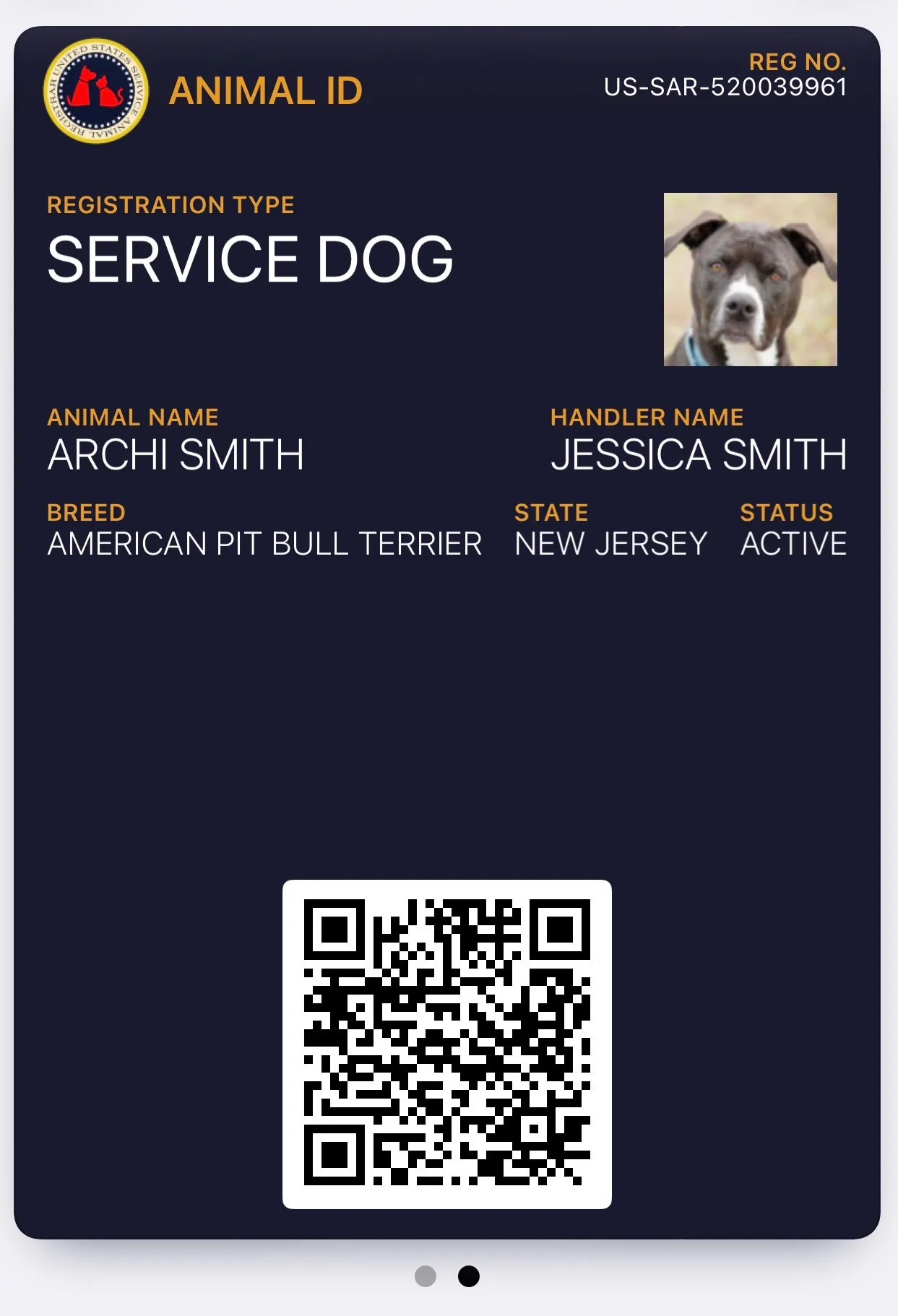
USSAR is a private registry that documents service dogs, emotional support animals, and psychiatric service dogs for handlers who want a consistent paper trail. We've operated since 2016 and have registered more than 109,000 animals across all 50 states.
We are not a government agency, a certifying body, or a training organization. We issue documentation — ID cards, certificates, letters, and wallet passes — that makes gate-counter and leasing-office conversations shorter.
Is registration required by law?
No. Neither the ADA nor the FHA requires handlers to register or certify a service animal or ESA. The U.S. Department of Justice is explicit about this, and we want to be explicit too: you have the same federal rights whether you register with us or not.
What registration gets you is practical friction reduction — a consistent ID, a verifiable QR code, wallet passes, and professionally formatted letters that staff and landlords recognize on sight. That's the real value; anyone who tells you a private registry is "legally required" is selling you something that doesn't exist.
DOJ FAQ on Service Animals — ada.govHow do I register?
Pick a package on the Packages page, then fill out the registration form. You'll enter your handler details, your animal's name and breed, upload a photo, and upload your electronic signature. Checkout is handled by Stripe; we never see or store your card number.
Digital documents (ID cards, certificates, letters) are available in your dashboard within minutes. Printed items, if your package includes them, ship within 3–5 business days.
What do I actually receive?
The exact list depends on your package, but every registration includes:
- A unique registration ID (format:
US-SAR-followed by 9 digits) - A digital ID card for your animal
- A registration certificate
- A live verification URL with QR code that anyone can check
- An account dashboard where documents are always available
Higher tiers add printed IDs, harnesses, leashes, collars, tags, and physical certificates. Elite and Premium include a full gear kit. See the Packages page for the per-tier breakdown.
How long does registration take?
The form itself takes about 10 minutes. Digital deliverables (ID card image, certificate PDF, wallet passes) are issued immediately after payment. Printed items print and ship within 3–5 business days; transit is USPS First-Class (standard) or Priority if your package includes it.
Most handlers have everything they need to present to a gate agent or landlord within an hour of checkout, even if the physical gear is still in the mail.
Can I register more than one animal?
Yes. Each animal gets its own registration. Multiple registrations under the same email address are automatically linked — when you sign in you'll see a switcher chip in the header that lets you swap between animals without signing out.
If you register three or more animals, email the address on your receipt before completing the additional registrations — we apply a 15% multi-animal discount.
What it costs.
Five tiers. Year-one prices are listed below; renewals after year one are a flat $29.99/yr on any tier that isn't already lifetime.
What are the five packages?
In plain terms:
- Build Your Own — from $59.98 Y1 ($29.99 Digital Animal ID + $29.99 Annual registration). Lifetime alternative $108.98 one-time. Pick only the items you want.
- Essential — $89 Y1 (defaults to Annual; lifetime toggle adds $50 at checkout for $139 one-time).
- Classic — $149 Y1 (defaults to Annual; lifetime toggle adds $50 at checkout for $199 one-time).
- Premium — $219 SD/PSD · $209 ESA. Lifetime only — no annual renewal ever.
- Elite — $349 SD/PSD · $299 ESA. Lifetime only, full gear kit.
Premium and Elite have ESA variants because those tiers drop the DOT Airline Transportation Form (Elite also swaps the red service-dog leash for a blue ESA leash) — ESAs don't have ACAA rights, so the form isn't useful.
Why does the price differ between SD and ESA on Premium and Elite?
Because the bundles contain different items. The Service Dog and Psychiatric Service Dog versions of Premium and Elite include a DOT Airline Transportation Form — a document Transportation Security regulations recognize for in-cabin service-dog travel. ESAs don't qualify for in-cabin ACAA protection, so including that form would be misleading. We take it out and discount the package accordingly.
Elite also swaps the red service-dog leash for a blue ESA leash, which is priced lower on our supplier invoice.
Are there hidden fees?
No. The price on the package page is what you pay at checkout. There are no setup fees, processing fees, or mandatory subscriptions. Two optional add-ons exist:
- Monthly subscription — Basic ($2.99/mo) or Pro ($4.99/mo). Unlocks Apple and Google Wallet passes, free profile edits, and priority support. Purely optional; you can cancel anytime.
- À la carte gear — extra tags, spare ID cards, harnesses, etc. You can buy these from the Shop anytime after registering.
Is there a multi-animal discount?
Yes — 15% off when you register three or more animals together under the same account. The discount is applied manually so the automation doesn't misidentify unrelated back-to-back registrations; email the address on your first receipt after you've paid for the first animal and we'll apply it to the subsequent two.
What payment methods do you accept?
Visa, Mastercard, American Express, Discover, Apple Pay, and Google Pay. All payments are processed by Stripe; we never see, store, or have access to your card number. Checkout pages use end-to-end TLS and card data is tokenized before it leaves your browser.
Annual vs. lifetime, monthly add-on.
The most confusing part of pricing. Here's how it works.
What's the difference between annual and lifetime?
Annual registrations renew every year for a flat $29.99/yr. Your first year is included in the package price (e.g., Essential is $89 Y1 which covers registration + documents + gear). Starting year two, Stripe bills $29.99/yr automatically until you cancel.
Lifetime registrations never renew. You pay once and the registration is active for the life of the animal, no matter how long that is.
Build Your Own, Essential, and Classic default to annual. Premium and Elite are lifetime only.
Can I upgrade from annual to lifetime later?
Yes. Any active annual registration can be switched to lifetime for a flat $50 one-time charge. The math: lifetime is $79.99, you've already paid $29.99 for the current year, so the difference is $50. This is available at checkout (toggle the lifetime switch on Essential/Classic cards) or anytime afterward from the Subscription tab in your dashboard.
The upgrade does not ship any new physical items — it's a status flip only. You already have the gear from your original package.
My registration lapsed. How do I reactivate?
Two options in your dashboard, under the Subscription tab:
- Restart the annual at $29.99/yr. Your registration goes active immediately; future years auto-renew.
- Activate lifetime for $79.99 flat. One payment, no future renewals.
Reactivations do not ship new physical items. We don't want to reprint your ID card or mail you a second harness; we just flip your status back to active so your verification URL returns a valid result and your wallet passes stop showing "expired".
What does the $2.99 / $4.99 monthly subscription do?
The monthly subscription is an optional add-on for features that have per-user running costs we'd rather not bake into the one-time registration price:
- Apple & Google Wallet passes. Apple and Google bill us per-active-pass, so we pass that cost through directly.
- Free profile edits. Without the subscription, name/address/photo changes after checkout cost $4.99 each. With it, they're unlimited and instant.
- Priority triage on messages you send from the dashboard Messages tab.
Basic ($2.99/mo) covers wallet passes and edits; Pro ($4.99/mo) adds priority triage. Cancel anytime from the Subscription tab; cancellation is effective at the end of the current billing period.
How do I cancel my subscription or registration?
Sign in to your dashboard and open the Subscription tab. You'll see a Cancel button for each active subscription. Monthly subs cancel at the end of the current billing period; annual subs cancel at the end of the current year — you keep active status until then.
Lifetime registrations don't have a cancel button because there's nothing to cancel — you paid once, you're done.
What happens if something goes wrong.
We replace rather than refund. That choice is deliberate — and we'll explain why.
What is your refund policy?
We operate on a replacement guarantee, not a refund policy. If your order doesn't arrive, arrives damaged, or contains an error we caused, we replace the affected items at no cost. That's the primary remedy.
We chose replacement over refund because it's honest — registration is a documentation service, and once we've generated the documents and issued a registration number, the work is done. Refunding the registration fee after someone's carried around the ID card for three months isn't reasonable; replacing a lost or damaged card without argument is.
For gear problems (damaged harness, torn tag, cracked ID card), open a request from the Replacements tab in your dashboard. Low-value items — ID cards, tags, luggage tags — auto-approve instantly; higher-value items (harness, collar, leash) get human review within 1 business day.
How do I file a replacement request?
Sign in, open the Replacements tab in your dashboard, and click "New request." You'll pick a reason (didn't arrive / damaged in transit / lost in transit / USSAR error / defective / other), check the items that need replacing, describe what happened, and optionally attach up to 5 photos.
Transit issues on low-value items (Animal ID, tags, certificate, letters) auto-approve at submission. Expensive items (harness, collar, leash) and "USSAR error" or "defective item" reasons route to staff for human review — we'll respond within 1 business day, usually same day during business hours.
My package never arrived. What now?
USPS delivery windows for First-Class Package are 2–5 business days domestic. If your tracking hasn't updated in 7+ days, or delivery was attempted to the wrong address, file a Replacement request with reason "didn't arrive." We'll reship without asking you to chase the first package — that's USPS's problem to untangle, not yours.
I made a mistake on my registration. Can I fix it?
Yes. Every field on your registration is editable from the Profile tab in your dashboard. Edits cost $4.99 each for one-time registration holders (it covers reissuing the updated ID card and regenerating PDFs), or they're unlimited and free with the monthly subscription.
If the mistake was ours — a typo we introduced during fulfillment, a misspelled name on a printed ID — file a Replacement request with reason "USSAR error." We fix it at no cost.
Signing in and managing your registrations.
How do I sign in to my account?
Go to /my_account/ and enter your email. We'll send you a magic-link sign-in email — click the link and you're signed in for 30 days. No passwords.
We did this on purpose. Passwords get reused, phished, and forgotten. Magic links are tied to your email inbox, which you already protect. If you can receive email, you can sign in.
I forgot my registration number.
You don't need it. Sign in with your email and it'll be in your dashboard on the Overview tab. If multiple registrations are linked to your email, you'll see all of them with a switcher chip in the header to swap between animals.
You also don't need your registration number to sign in — it's email-only. If you can't find the email address you used, email the primary address on any payment receipt and staff can help reconcile.
Can I change the email address on my account?
Yes — send a message from the dashboard Messages tab using your current address, naming the new email you want, and we'll verify and move the account over. We do the swap manually so someone with stolen access to your email inbox can't silently move your registrations to a different address.
How do I get in touch with a human?
If you're signed in, the fastest path is the Messages tab in your dashboard — it routes straight to staff and your entry details are already attached, so there's no back-and-forth about which registration you're asking about. We reply within 1 business day (usually same day during business hours).
If you're not signed in or you're a prospective handler, use the Contact form. Name, email, message — one step.
Service dogs and the ADA.
For task-trained service dogs that accompany a handler with a disability in public accommodations.
What is a service animal?
Under the ADA, a service animal is a dog (or, under a separate narrow provision, a miniature horse) that has been individually trained to perform tasks directly related to a person's disability. All three elements must be present.
"Tasks directly related to a disability" is a technical phrase — it means the dog does something concrete the handler couldn't do alone. Guiding a blind handler, alerting to blood-sugar changes, retrieving dropped objects, interrupting self-harm behavior — these are tasks. Providing emotional comfort by being present is not a task under ADA service-animal rules (it's valuable, but it's what defines an ESA, not a service animal).
28 CFR §36.104How do I qualify for a service dog?
Two criteria, both required:
- You have a disability — a physical or mental impairment that substantially limits a major life activity (ADA definition; a formal diagnosis is not strictly required by the ADA but is usually how this is established).
- The dog is task-trained — it performs specific, repeatable work directly related to your disability.
The ADA does not require professional training — owner-trained service dogs are fully protected. It does require actual training; a dog that just "knows you're stressed" without a specific task isn't a service animal under the ADA.
What can businesses ask me?
Exactly two questions, from federal regulation:
- Is the dog a service animal required because of a disability?
- What work or task has the dog been trained to perform?
Businesses cannot ask about your disability, demand medical documentation, require proof of training, ask the dog to perform the task, or require an ID or vest. If staff refuse access after you've answered the two questions, that's an ADA violation — see our ADA Resources page for enforcement options.
What rights do service dogs have?
Under federal law:
- ADA Titles II & III — access to public accommodations: restaurants, stores, hotels, government offices, most places open to the public.
- Fair Housing Act — access to no-pet housing, no pet fees, no breed or size restrictions.
- Air Carrier Access Act — in-cabin air travel on U.S. carriers with the DOT Transportation Form.
- ADA Title I — reasonable workplace accommodations (employer-dependent).
Service dogs must remain under the handler's control and may be excluded if they're out of control, not housebroken, or pose a direct threat. See the Public Access page for the behavior standards.
Emotional support animals.
Different legal framework, different rights. ESAs are covered by the Fair Housing Act but not the ADA.
What is an emotional support animal?
An ESA is an animal whose presence provides emotional or psychological support to a person with a mental-health or emotional disability. Unlike service dogs, ESAs are not task-trained — their therapeutic value is their companionship itself.
ESAs can be any species (dogs and cats are most common, but ferrets, rabbits, and small birds also qualify in many letter contexts). They do not have ADA public access rights — restaurants, stores, and offices are not required to accommodate them.
How do I qualify for an ESA?
You need an ESA letter from a licensed mental-health professional — a doctor, therapist, psychologist, psychiatrist, or licensed clinical social worker. The letter confirms (1) you have a diagnosed mental-health condition, and (2) having an ESA is therapeutically appropriate for that condition.
USSAR does not issue ESA letters. If you don't already have a treating provider, two services we've seen handlers use successfully are CertaPet and Pettable. We have no affiliate relationship with either — we just know they operate in the mainstream and don't issue letters to every applicant, which is the right thing for a legitimate provider to do.
What rights does an ESA have?
Two federal protections:
- Fair Housing Act — reasonable accommodation in housing. Landlords must waive no-pet policies and cannot charge pet fees or deposits for an ESA with a valid letter. Breed and size restrictions don't apply.
- Historical note: ESAs used to have in-cabin air travel rights under the ACAA. That changed in December 2020 when the DOT amended the ACAA to cover only task-trained service animals. ESAs are now treated as pets on U.S. airlines.
The FHA is the meaningful protection. See our Housing Rights page for landlord do's and don'ts and a reasonable-accommodation request template.
What's the difference between an ESA and a service dog?
Training. A service dog is task-trained; an ESA provides support through companionship alone.
That one difference cascades through the rest. Service dogs have public access rights (ADA), housing rights (FHA), and air travel rights (ACAA). ESAs have housing rights (FHA) but not public access and not air travel. If you need your animal to accompany you to restaurants, stores, or in the cabin on a flight, you need a task-trained service dog, not an ESA.
Psychiatric service dogs (PSDs).
Task-trained service dogs for psychiatric or emotional disabilities. Full ADA public access.
What is a psychiatric service dog?
A PSD is a service dog specifically trained to perform tasks related to a psychiatric or emotional disability. Examples of trained tasks:
- Interrupting panic attacks, intrusive thoughts, or dissociative episodes
- Deep pressure therapy on cue
- Alerting to rising anxiety, PTSD flashbacks, or early-onset panic symptoms
- Grounding the handler in crowded or triggering environments
- Medication reminders or waking the handler from night terrors
- Creating physical space in crowds for agoraphobic handlers
PSDs have the same ADA status as any other service dog — full public access under Titles II and III.
How is a PSD different from an ESA?
Task training. A PSD is individually trained to perform specific, repeatable tasks related to a psychiatric disability. An ESA provides support through companionship alone. The ADA draws a bright line on that distinction: tasks = service dog, companionship alone = ESA, no public access for the latter.
Both can help with the same underlying condition. But the legal status, the rights, and the access are different because the definition hinges on whether the dog has been taught to do something.
What rights does a PSD have?
Identical to any other ADA service dog: public access under Titles II and III, housing under the FHA, in-cabin air travel with the DOT form, and workplace accommodations under ADA Title I. A PSD is a service dog — the "psychiatric" qualifier names the disability category, not a separate legal class.
Can I train my own PSD?
Yes. The ADA does not require professional training for any service dog, including psychiatric service dogs. Owner-training is common and fully protected by federal law.
That said — PSDs are working animals that must pass the same behavior standards as any service dog (calm in public, not reactive, fully housebroken, responsive to handler, able to perform tasks reliably). See the Public Access page for the 12-component evaluation handlers use to confirm their dog is ready.
Out in the world.
Three places handlers run into friction most often: airports, landlords, and retail staff.
How does flying with a service dog work?
U.S. airlines fly service dogs in-cabin at no cost under the ACAA. You'll need to submit the DOT Service Animal Air Transportation Form (SATF) ahead of your flight — each airline has their own upload portal. Our Premium and Elite packages include a pre-formatted DOT form; we also offer it as an à la carte document for other tiers.
See our Flying page for airline-by-airline links to the upload portals plus the 48-hour advance-submission windows most carriers enforce.
Can I fly with an ESA?
Not in-cabin as an ESA on U.S. airlines. The DOT amended the ACAA in December 2020 to remove ESA coverage. ESAs now fly as pets — checked or in-cabin per each airline's pet policy, with pet fees and carrier-size limits applying.
If your condition qualifies for a psychiatric service dog (task-trained), that pathway gives you in-cabin access. Otherwise, for an ESA specifically, you'll follow each airline's pet rules.
What are my housing rights?
Under the Fair Housing Act, landlords and property managers must grant a reasonable accommodation for a service dog or ESA. That means:
- No-pet policies are waived
- No pet deposit or monthly pet fee
- No breed or size restrictions
- The accommodation must be processed in a reasonable timeframe (typically 10–14 days)
Landlords can still hold you responsible for damage beyond normal wear and tear (that's a liability rule, not a pet rule, and it applies to all tenants). And they may request documentation — for an ESA, that's your letter from a licensed mental-health professional; for a service dog, the two-question rule applies. See the Housing Rights page for the full framework and a sample accommodation-request letter.
A store or restaurant refused my service dog. What do I do?
First, confirm the refusal is actually illegal. Legitimate refusal grounds: the dog is out of control, not housebroken, or posing a direct threat. Illegitimate grounds: allergies elsewhere on the premises, breed, size, lack of ID or vest, or "policy."
If the refusal is illegitimate, stay calm, ask for the manager, and politely reference the two-question rule (28 CFR §36.302(c)(6)). If they still refuse, leave and file a DOJ ADA complaint at ada.gov. DOJ takes ADA complaints seriously and has litigated many.
The Public Access page has de-escalation scripts for the six most common refusal scenarios.
The rest.
Legitimacy, privacy, wallet passes, and the questions we get that don't fit neatly anywhere else.
Is USSAR a legitimate registry?
We're a private documentation service, not a government authority — and to be clear, no government-run service dog registry exists in the United States. The DOJ has confirmed this in its ADA FAQ.
What makes a registry "legitimate" in our view: it tells the truth about what it is and isn't, its documents match what federal law actually recognizes (the DOT form, an ESA letter, a reasonable-accommodation request), its verification is real (a live URL, not a printable badge), and its customer service is staffed by humans. We meet those standards.
Registries that claim to issue "federally certified" IDs, "legally mandatory" certifications, or "ADA licenses" are misrepresenting what they sell. See our Avoid Scams page for the pattern to watch for.
How do Apple and Google Wallet passes work?
After you register and activate a Basic or Pro monthly subscription, your dashboard has two buttons: "Add to Apple Wallet" and "Add to Google Wallet." Click either; your phone installs a pass containing your animal's photo, registration number, type, handler name, and a live QR verification link.
Wallet passes update automatically when you edit your profile — change your photo and the pass on your phone updates within seconds. The QR scans to our public verification page, which shows current registration status in real time.
Wallet passes require an active monthly subscription because Apple and Google bill us per active pass on a rolling monthly basis. The monthly sub is how we pass that cost through directly rather than bake it into the one-time price for everyone whether they want the feature or not.
How does verification work?
Every registration has a public verification URL: usserviceanimalregistrar.org/verify/?reg=US-SAR-XXXXXXXXX. Anyone with the registration number can paste it (or scan the QR on your ID card) to see the animal's name, photo, type, handler name, state, and current status.
We deliberately show limited data — not your address, phone number, or disability. Landlords, gate agents, and retail staff only need to confirm the registration is real and active, not read your medical history.
Try it at the Verify page.
What data do you collect, and how do you protect it?
We collect the information you type into the registration form (name, email, address for shipping, animal details, photo, and signature), your payment method metadata from Stripe (never the card number itself), and access logs for the dashboard.
We do not sell, rent, or share handler data with advertisers, data brokers, or third parties. Photos and signatures are stored in Google Cloud Storage under a dedicated bucket. See the Privacy Policy for the full disclosure.
Is the information on this site legal advice?
No. Everything on this site is general information about how the ADA, FHA, and ACAA work in practice — written to be accurate and footnoted where possible. It is not legal advice about your specific situation. If you're facing a discrimination complaint, an eviction, or an enforcement action, consult a licensed attorney who practices disability-rights law in your state. ADA.gov maintains an information line at 1-800-514-0301 for general questions.
Do you ever change your prices or policies?
Yes, occasionally. When we do, existing registrations are grandfathered — if you bought a lifetime registration in 2019, it's still lifetime, no matter what the current price list says. If we change the renewal price on annual registrations, active subscribers get 30 days' notice by email before the new rate applies. We don't pull the rug out on people who've already paid.
No questions match that search.
Try a different term — or clear the search to see all 48 questions.
Signed in? Use the Messages tab.
Fastest path to a human when you already have a registration. Your entry details are auto-attached — no "what's your registration number?" back-and-forth. Replies within 1 business day.
Open dashboardNot yet registered? Use the contact form.
For prospective handlers, billing questions before checkout, or anyone who can't access their account. Name, email, message — one step, no account required.
Go to contact formReady to register?
Ten minutes to complete the form. Digital documents arrive in your inbox immediately.
This page is informational, not legal advice.
Answers above describe how the ADA, FHA, and ACAA generally apply, drawing on federal regulations and published DOJ guidance. They are not legal advice about your specific situation. For the authoritative source, visit ada.gov or call the ADA Information Line at 1-800-514-0301.